

OTM – Test executive software
Test executive software. Install it in minutes and start building tests the same day. Build and change tests without compiling.

Write the test. Run it.
No compiling.
Pick built-in steps or call functions in your own .NET DLLs. Enter the limits and run. Anyone who knows the unit can do it.
1 · Pick a step
Built-in steps such as if, wait, timer and math, or a function from your DLLs.

2 · Set the limits
Enter Min and Max, then choose what goes in the report.

3 · Run and refine
Run it, debug it step by step, and change it any time.
For each step, choose what happens if it fails: continue, repeat, abort or ask the operator.
Describe the test. Your AI assistant builds and runs it in OTM.
OTM’s MCP server connects AI assistants such as Claude to your test station. The assistant reads your drivers, builds the tests and limits, runs them and checks the results. AI is optional: OTM runs fully offline.

Give it your test requirements document (TRD) or test procedure, or describe the test in plain language.
The assistant builds the tests and their limits from your document, using the drivers on your station.
Run it in OTM. Review every step in the editor and change anything by hand.
Real OTM session. Measurements are simulated; no chamber was connected.
From driver method to running test.
Instrument code lives in your .NET drivers, and you write it once. Loops and conditions are ready-made steps, and limits go in a table.
- 1
Pick a method
Choose a .NET driver and the method to call. OTM reads the method’s parameters and lists them as fields to fill in.

- 2
Set the limits
Enter the minimum and maximum for each result. OTM checks every value against them as the test runs.

- 3
Run it and step through it
Run it right away, with nothing to compile. Go step by step, or stop at a breakpoint to check a value, then continue.
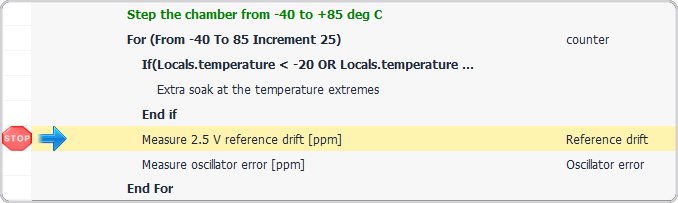


Create and run thermal profiles easily.
Define the temperature profile in OTM and choose exactly which tests run at each temperature step. OTM syncs with the chamber in one of three ways: it controls the chamber remotely, waits for its AUX signal, or follows the PC clock.

Find any run and generate its report in one click.
Every run is saved to the database. Filter by status, date and any combination of UUT properties. You can generate a report while the test is still running.


Entering the UUT details

Generating a report
See which test fails, where and when.
The built-in OTM Statistics Analyzer tracks the history of every UUT, test and measurement in clear graphical views.

Continuous trend monitoring for every measurement
Pick a measurement to see every value over time against its Min and Max.

Simulated data.
One platform for building, running, archiving and statistical analysis.
Most ATE setups need several tools for this. OTM is one product.
Comparison based on published product information, October 2026.
Also in OTM.
“I highly recommend OTM. … Its archive lets you slice results by test type, date and serial number.”
See how a test is built and run in OTM
Book an online demo today
Orion has developed OTM since 2013, and it now runs on hundreds of test stations across the industry. We’re fully flexible: we can develop drivers, tests and new features for your project, quoted per project. Customer references are available on request.
Book a demoOr email ronen@orion-software.co.il